
Congratulations, you’re looking into subscription payments on Shopify.
If you’ve been wondering how brands get customers to come back and buy again automatically, you’re in the right place.
This blog will explain subscription payments in the simplest way possible, what they mean, how they work on Shopify, and how you can use them for your own store. You don’t need any technical knowledge. By the end, you’ll clearly understand whether subscriptions make sense for your business and what your next step should be.
Why subscription payments are a game-changer for your Shopify store
Imagine your business as a garden. Without subscriptions, you're constantly planting new seeds, hoping they'll grow. With subscriptions, you're cultivating a thriving, perennial garden that yields consistent harvests. This isn't just about selling more; it's about building a more resilient, predictable business.
The power of predictable revenue
The biggest advantage? Predictable revenue. Instead of fluctuating sales cycles, you gain a clearer picture of your incoming cash flow. This stability allows for smarter inventory management, more confident marketing investments, and better long-term strategic planning. It transforms your business from a volatile sprint into a marathon with a clear finish line. Think of it like a steady stream flowing into your business, rather than relying on sporadic rainfall.
Enhanced customer loyalty
Subscriptions naturally foster deeper customer relationships. When someone commits to a recurring purchase, they're not just buying a product; they're joining an experience. This ongoing interaction creates opportunities for personalized communication, exclusive offers, and a stronger brand connection. It moves your customers from transactional buyers to community members, leading to higher retention rates and invaluable word-of-mouth marketing.
How Shopify subscription payments actually work
At a technical level, subscription payments on Shopify follow a different flow than one-time purchases. When a customer subscribes, their payment method is securely stored and authorized for future charges. Instead of initiating a full checkout every time, Shopify triggers automated recurring payment attempts based on the billing schedule defined in the subscription.
The first transaction typically happens through the Shopify checkout, where the customer explicitly consents to recurring billing. For subsequent renewals, Shopify processes payments automatically using the saved authorization, without requiring the customer to re-enter their details. This automation is what enables subscriptions to scale—but it also introduces new complexities that don’t exist with one-time orders.
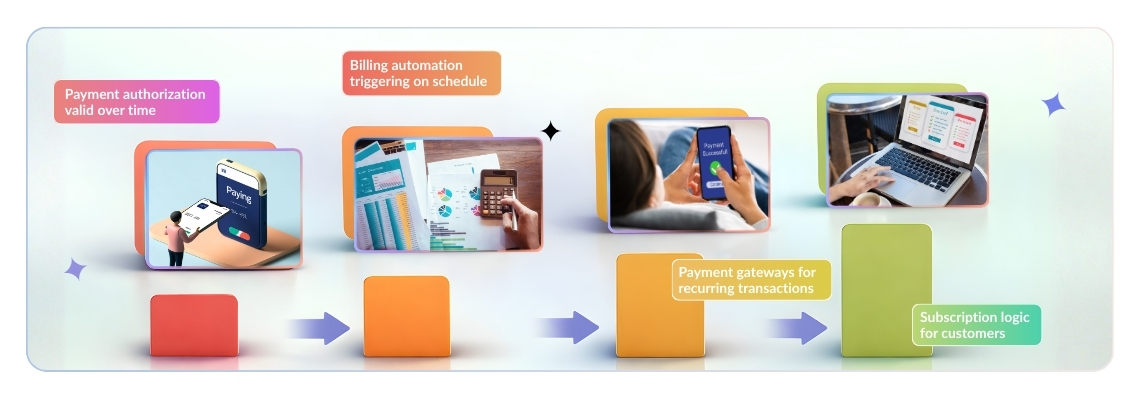
Subscription payments rely on several moving parts working together:
- Payment authorization that remains valid over time
- Billing automation that triggers charges on the correct schedule
- Payment gateways that support recurring transactions
- Subscription logic that determines when and how customers are charged
Because renewals happen in the background, merchants often don’t realize there’s an issue until a payment fails. This makes monitoring and handling recurring payments just as important as setting them up correctly in the first place.
Before we dive into the "how," let's understand the essential building blocks. Shopify provides a solid foundation, but the true power often comes from specialized tools.
Understanding shopify's native subscription tools
Shopify has significantly enhanced its native subscription capabilities. For many basic subscription models, you can now manage recurring billing directly within the Shopify admin, particularly if you're using Shopify Payments. This allows for straightforward setup of subscription products, management of customer subscriptions, and basic reporting, offering a streamlined experience without immediately needing a third-party app. It's a great starting point, especially for merchants who prefer a simpler, integrated solution.
The role of third-party subscription apps
While Shopify's native tools are powerful, third-party apps like Recurpay, where you unlock advanced functionality. These apps are like specialized engineers for your subscription business. They offer features such as robust dunning management (recovering failed payments), sophisticated customer portals for self-management, advanced bundling options, intricate discount structures, detailed analytics, and integrations with other marketing and fulfillment tools. For businesses looking to scale their subscription offerings or implement complex models, an app becomes indispensable.
Shopify’s native subscriptions vs third-party subscription apps
Shopify’s native subscription functionality works well for merchants with simple subscription needs. If you’re offering a straightforward recurring product with limited billing logic and minimal customization, Shopify’s built-in tools can be a good starting point. They provide basic subscription creation, customer management, and integration with Shopify Payments, all within the Shopify admin.
However, as subscription programs grow, merchants often encounter limitations. Advanced requirements like flexible billing schedules, detailed analytics, customer self-service portals, payment recovery workflows, and subscription automation typically require third-party apps.
Third-party subscription apps are designed to handle these complexities. They extend Shopify’s native capabilities by offering:
- Automated retry and dunning logic for failed payments
- More control over billing cycles and subscription plans
- Deeper visibility into subscription performance
- Better customer management and retention tools
In practice, many merchants start with Shopify’s native subscriptions and later move to a third-party solution as their subscription business matures. The right choice depends on the complexity of your offering, the importance of payment reliability, and how much control you need over the subscription lifecycle.
Setting up subscriptions on Shopify: A step-by-step guide
Now, let's get practical. This is your blueprint for launching a successful subscription program.
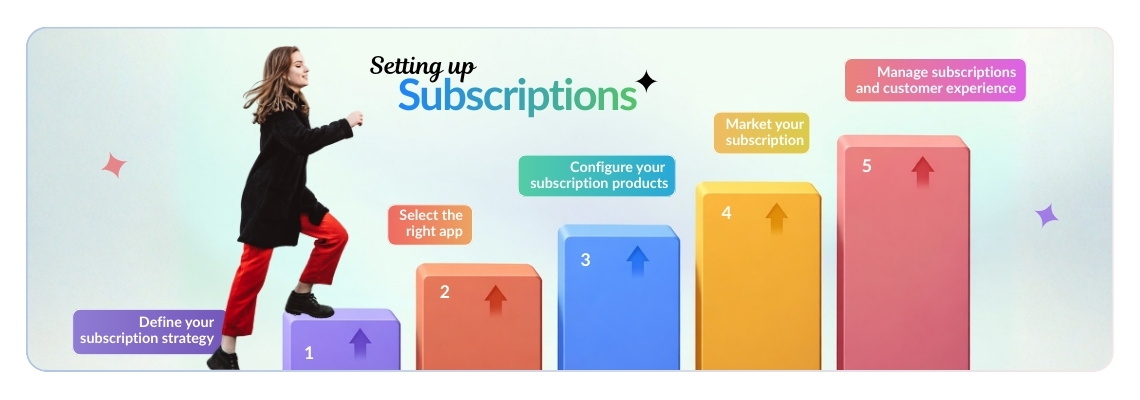
Step 1: Choose your subscription strategy
Before touching any settings, define your “why” and “what”:
- Are you offering:
- Replenishment (e.g., coffee beans every month)
- Curation (e.g., a monthly beauty box)
- Access (e.g., a membership to exclusive content)?
- Consider:
- Pricing models (pay-per-delivery vs. prepaid)
- Frequency options (weekly, monthly, quarterly)
- How you’ll differentiate your subscription from a one-time purchase
This foundational strategy will guide every subsequent decision.
Step 2: Selecting the right subscription app
If your strategy requires more than Shopify’s native capabilities:
- Head to the Shopify App Store
- Look for apps like: Recurpay, Recharge, Bold Subscriptions, or Appstle Subscriptions. Here is a detailed comparison of best subscription apps on shopify
- Choose an app that aligns with both your current needs and future growth plans.
- Read reviews and compare features against your strategy
- Pay close attention to pricing models:
- Percentage of subscription revenue
- Flat monthly fees
- Pay close attention to pricing models:
Use free trials where available to test before committing
Step 3: Configuring your subscription products
Once your app is installed (or if you’re using native Shopify subscriptions):
- Enable the subscription option for each product
- Configure:
- Delivery frequencies (e.g., every 30 or 60 days)
- Pricing (including any subscription discounts)
- Minimum commitment requirements, if applicable
- Ensure product descriptions clearly communicate the benefits of subscribing
This is where customers clearly understand why they should commit.
Step 4: Market your subscription
Once your subscription strategy is defined, it’s important to actively market it so customers understand the value of committing long-term.
- Highlight subscription benefits clearly on product pages
- Use banners, badges, or messaging to promote “Subscribe & Save”
- Communicate subscription value through email, SMS, and post-purchase flows
- Educate customers on convenience, savings, and flexibility
Effective marketing ensures customers don’t overlook the subscription option during checkout.
If your subscription messaging is buried in Shopify's default checkout, a checkout extension app can add visible banners, "Subscribe & Save" badges, and discount widgets directly on the checkout page itself, without a developer.
Step 5: Managing subscriptions and customer experience
Your chosen app or Shopify’s native tools will provide a dashboard to manage active subscriptions:
- Handle:
- Cancellations
- Pauses
- Skips
- Customer information updates
- Pay close attention to the customer portal:
- Enables self-service subscription management
- Reduces support tickets
- Improves overall experience
A smooth, intuitive customer portal is vital for long-term retention.
Maximizing your subscription success
Launching is just the beginning. True success comes from continuous refinement and a customer-centric approach.

Offer flexibility and value
The modern subscriber expects control. Allow them to easily pause, skip, or modify their subscriptions. Offer tiered pricing or bundle options to cater to different needs. Continually evaluate if the value you provide justifies the recurring cost. Are there exclusive perks, content, or discounts only available to subscribers? Make your subscribers feel like VIPs.
Communicate clearly and proactively
Transparency builds trust. Clearly state billing dates, upcoming charges, and any changes to their subscription. Use automated emails for order confirmations, shipping notifications, and reminders. Proactively address potential issues, like expiring payment methods, to prevent churn. A simple email saying, "Your card on file is expiring soon, please update it to avoid interruption!" can save a subscription.
Analyze and optimize
Your subscription business generates a wealth of data. Track key metrics like customer acquisition cost (CAC), customer lifetime value (LTV), churn rate, and average revenue per user (ARPU). Use this data to understand what's working and what isn't. A/B test different pricing strategies, offer incentives, and refine your product offerings. Continuous analysis and optimization are the engines of long-term growth.
What happens when Shopify subscription payments fail
Failed subscription payments are a common operational challenge for Shopify merchants. Expired cards, insufficient funds, and bank declines can interrupt recurring billing even when customers intend to continue their subscriptions. Without proper recovery mechanisms, these failures often lead to involuntary churn and lost recurring revenue.
To address this, some merchants use specialized tools like Recurpay, which focus specifically on subscription payment recovery. These tools help manage automated retries, customer notifications, and payment recovery workflows, reducing revenue loss caused by failed recurring payments and improving overall subscription continuity.
Ready to dive into the subscription economy?
The subscription economy offers an incredible opportunity to build a more stable, customer-centric business. By carefully planning your strategy, leveraging the right tools, and committing to ongoing optimization, you can transform your Shopify store into a recurring revenue powerhouse. It's not just about selling products; it's about building relationships and creating lasting value for your customers and your business.