



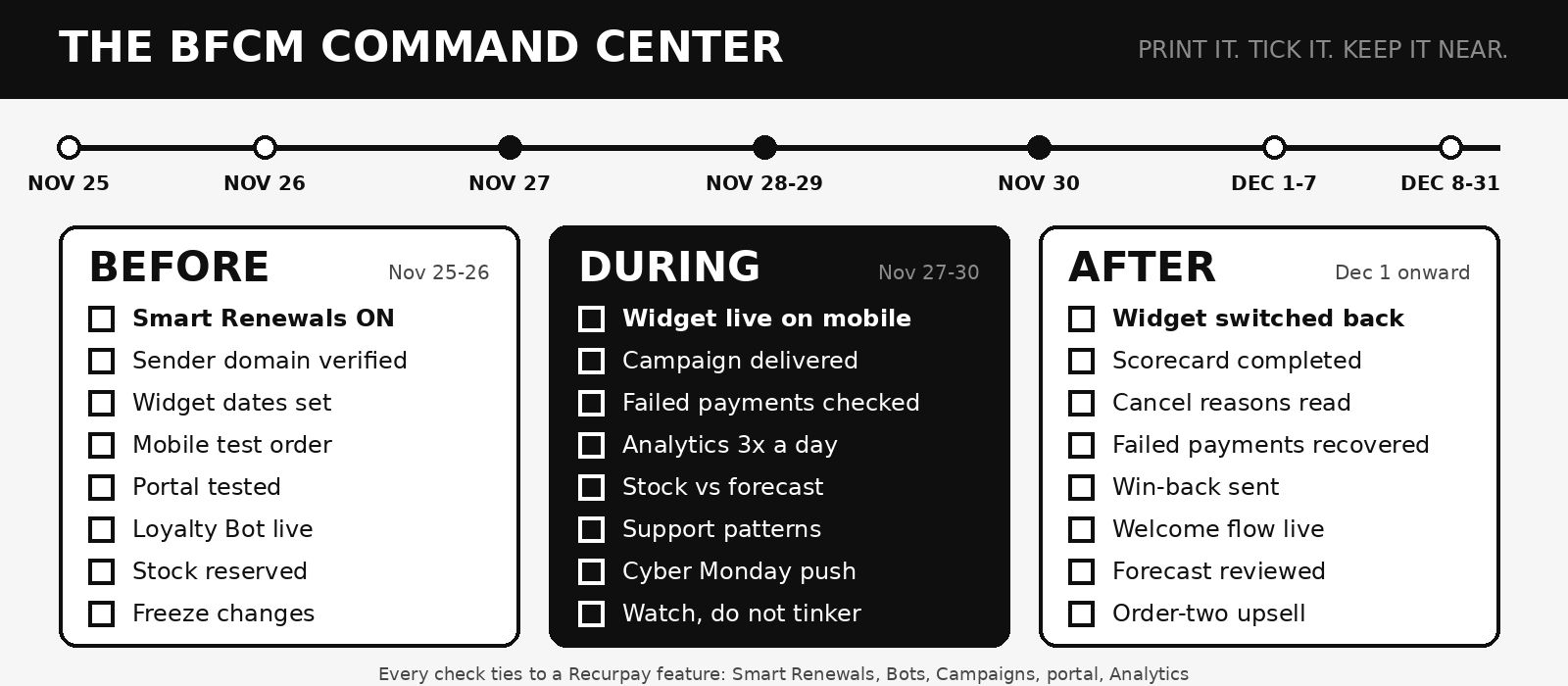
This is not another BFCM strategy checklist. The 18-step plan lives in our BFCM checklist for subscription brands. This is the printable worksheet for the last 48 hours. Download it or print it, keep it beside your Recurpay dashboard and tick every box as you plan your BFCM, so nothing is left to memory on the busiest weekend of the year.

Summary: 

It is the start of BFCM week. Black Friday starts on November 27 and Cyber Monday ends on November 30, 2026. Whatever you have not tested by tomorrow night, your customers will test for you. This worksheet holds the last-minute checks every subscription founder wishes they had made, organised into three phases (before, during and after BFCM) as tables with a box to tick beside every line. Each row explains why it matters and which Recurpay feature helps, so you are never left guessing. If you only have an hour today, start with the ten non-negotiables.

Recurpay is a Shopify subscription app built for brands that want subscriptions to feel simple for both the team and the customer. Rated 5.0 on the Shopify App Store from 583 reviews and trusted by 7,500+ brands, it gives you a no-code subscription widget, a self-serve customer portal, Revenue Boosters, Recurpay Bots, Campaigns, Analytics, integrations, API and Webhooks, white glove migration and 24/7 human support. For a feature-by-feature playbook, read the best ways to use Recurpay features during BFCM 2026.

How to use this worksheet: Work through the tables in order. Anything marked ■ CRITICAL will cost you sales or subscribers if it is missed. Strike out any row that does not apply to your store and move on. Step-by-step Recurpay guides for every feature are collected in one section near the end.

Book a Recurpay Demo Start here

Or you can talk to us


BFCM Special, 0% transaction fee on Launch $9 / Grow $19 / Scale $99, new merchants only, valid until 30 Dec 2026. See Recurpay plans and pricing
‍

BFCM 2026 forty-eight hour countdown checklist for subscription brands
‍

Summary Table: Your BFCM 2026 Checklist at a Glance

Use this table as your one-page map. It shows each phase, the single job to finish in it and the Recurpay features that make that job faster.

Phase

When

The one job

Recurpay features that help

1. Final 48 hours

Nov 25

Switch on, connect and verify

Revenue Boosters, Smart Renewals, Bots, widget, domain verification

2. Dress rehearsal

Nov 26

Test like a customer, then freeze

Customer portal, instant order, Campaigns, support contact

3. Black Friday

Nov 27

Launch cleanly and watch the first hours

BFCM Vibrant Widget, Analytics, failed payments view

4. The weekend

Nov 28 to 29

Protect margin and stock

Bots, inventory policies, Renewals Calendar

5. Cyber Monday

Nov 30

Last push to one-time buyers and gift shoppers

Convert One-Time Buyers, gift subscriptions, Campaigns

6. Recovery

Dec 1 to 7

Read the results and recover what slipped

Analytics, cancelled reasons, Smart Renewals, win-back

7. The renewal wave

Dec 8 to 31

Keep first-time subscribers past order two

Subscription Forecast, bulk next-order date, portal

Why the Last 48 Hours Decide Your BFCM

Every founder knows the feeling: the offer is built, the creative is ready, and a quiet voice asks whether the renewals will actually go through. That voice is right to ask. The numbers say BFCM is won and lost on details most people check too late.

The lesson is simple. Acquisition gets the attention, but the money is made by the subscribers who are still paying you in February. These are the checks that protect them.

The 10 Non-Negotiables: If You Only Have One Hour Today

Stop reading and do these first. If the clock is against you today, these ten checks protect the most revenue, and each takes minutes with Recurpay's tools.

Done

#

Check

Why it cannot wait

Where Recurpay helps

☐

1

Smart Renewals is switched on

A bounced card on Black Friday should become a recovered payment, not a lost subscriber

Revenue Boosters > Smart Renewals, with retry logic tested over 1M+ transactions

☐

2

Sender domain is verified

Reminders and Campaigns that land in spam recover nothing

Verify your sender domain in Recurpay

☐

3

BFCM widget dates are set and live

An expired or missing offer means customers see last month's price

BFCM Vibrant Widget: Seasonal Sale start and end timer under App Embeds > Recurpay

☐

4

You placed one real test order on your phone

Most shoppers buy on mobile, so test where they buy

Recurpay widget on every subscription product page

☐

5

You tested the customer portal as a customer

Skip, pause and swap must work before the support queue fills

Self-serve portal: skip, pause, swap, edit items, change frequency

☐

6

One loyalty rule is live

Rewarding order two or three protects margin better than a deeper first discount

Recurpay Bots (If → Then)

☐

7

Cancellation protection is set

Stops a one-box-and-gone pattern

Minimum orders before cancellation, cancellation rules

☐

8

Stock is reserved for renewals

December renewals need inventory that Black Friday can drain

Product Inventory Forecast, inventory policies

☐

9

Someone owns the dashboard

Problems found in minutes are cheap; found in days they are not

Analytics and the 24/7 support team

☐

10

Changes are frozen after tomorrow night

Last-minute edits break tested flows

Recurpay Go-Live checklist

Book a Recurpay Demo Start here

Or you can talk to us


BFCM Special, 0% transaction fee on Launch $9 / Grow $19 / Scale $99, new merchants only, valid until 30 Dec 2026. See Recurpay plans and pricing

Part 1: Before BFCM, the Final 48 Hours (November 25 and 26)

This is the part that separates a calm Black Friday from a chaotic one. You have two days. Today is for switching on, connecting and verifying. Tomorrow is a dress rehearsal and a freeze. Work through every table; where a row does not apply to your store, strike it out and move on.

Today, November 25: Switch On, Connect, Verify

Table A: Your Offer and Your Widget

Your widget is the first thing every shopper sees. These six checks make sure the offer is clear, correctly dated and showing on every subscription product before traffic arrives. Still choosing a layout? Compare six styles in our guide to the best Shopify subscription widgets for BFCM 2026.

Done

Check

Why it matters on Black Friday

How Recurpay helps

☐

Write the offer in one plain sentence on the widget (the saving, the gift or the frequency)

Shoppers decide in seconds; vague offers lose to clear ones

Edit the text and translations in the widget design settings

☐

Set your Seasonal Sale dates (start Nov 27, end Nov 30)

The offer appears and disappears on schedule without you logging in at midnight

BFCM Vibrant Widget start and end dates, under Theme editor > App Embeds > Recurpay

☐

Confirm the widget shows on every subscription product

One product without the widget is one product that cannot create a subscriber

Widget enabled through App Embeds; check each product page

☐

Match colors, buttons and language to your brand and every market you sell in

A widget that looks foreign erodes trust

Widget colors, button colors and translations

☐

Need a different layout? Use the AI Widget Designer

Rebuilding by hand today is risky; upload an image and edit the generated code

AI Widget Designer with a code editor

☐

Add a free gift or tier to the offer if you planned one

A gift protects price while still motivating action

Free gifts and tiered discounting in subscription plans


Table B: Payments and Renewals

A bounced card on Black Friday should become a recovered payment, not a lost subscriber. Set these up today so retries, reminders and payment links run automatically.

Done

Check

Why it matters on Black Friday

How Recurpay helps

☐

Turn on Smart Renewals ■ CRITICAL

Failed payments are the quietest way to lose a subscriber

Revenue Boosters > Smart Renewals: smart retries, then a payment link and reminder

☐

Verify your sender domain ■ CRITICAL

Reminders that reach the inbox recover payments

Verify sender domain in Recurpay

☐

Place one real subscription order with a live gateway, then check the renewal setup

Test mode hides live-payment surprises

Checkout with Stripe, Shop Pay, PayPal, Razorpay, Cashfree, PayU and Mollie

☐

Confirm your payment methods work for subscriptions

A method that fails on recurring charges costs you the sale

Gateway and payment method support in Recurpay

☐

Review your dunning reminders (timing, wording, sender)

Calm, clear reminders get replies; harsh ones get cancellations

Smart dunning, timezone-aware reminders

☐

Name one person who owns the failed-payment list for the whole sale

Someone must look at it every day

Analytics and the Smart Renewals payment link


Table C: Revenue Boosters and Loyalty Rules

This is where BFCM turns into extra revenue. Switch on the boosters, then add loyalty rules that reward the orders you want, not just the first one.

Done

Check

Why it matters on Black Friday

How Recurpay helps

☐

Switch on Upsell Existing Subscribers and pick three add-on products

Your existing subscribers are the easiest extra revenue of the weekend

Revenue Boosters: upsell in the portal, cart and account

☐

Switch on Convert One-Time Buyers

Black Friday first-timers are your biggest untapped pool

Revenue Boosters > Convert One-Time Buyers

☐

Build one loyalty Bot (for example, 10% off the third order)

Rewards orders that earn it instead of discounting everything

Recurpay Bots: If order number, Then give discount

☐

Build one value Bot (free shipping or a free product above a set subscription amount)

Lifts basket size without a sitewide price cut

Bots: Override shipping rate, Add free product

☐

Decide on a prepaid or gift plan

Cyber Monday shoppers are often buying for someone else

Prepaid plans and gift subscriptions

☐

Check Build a Box and mixed cart if you use them

Complex flows break first under traffic

Build a Box, mixed cart checkout


Table D: Portal and Retention Guardrails

Guardrails keep your Black Friday subscribers longer. These checks protect against unwanted cancellations and make skipping, pausing or swapping easier to find.

Done

Check

Why it matters on Black Friday

How Recurpay helps

☐

Set minimum orders before cancellation

A discounted first box should be earned back

Minimum orders before cancellation

☐

Add a cancellation rule that matches your policy

Predictable cancellations are easier to plan around

Cancellation rules and cancellation reasons

☐

Make skip and pause easier to find than cancel

Subscribers who only need a break should have an easy way to take one

Self-serve portal: skip, pause, swap, change frequency

☐

Allow edit items and next order date changes

Customers who adjust stay longer than customers who cancel

Edit items, change next order date, instant order in the portal

☐

Open the portal as a customer and click every button once

The portal is your best support agent only if it works

Customer portal set-up

☐

Check portal upsell offers are visible and priced correctly

Wrong prices in the portal are the most embarrassing errors

Upsell offers in the customer portal and account


Table E: Campaigns, Email and Data

Your messages carry the offer to the people who will buy it. Schedule them now, test them on a phone and make sure every click lands on a subscription page.  If part of your stack is still missing, see our picks for the best Shopify apps for Black Friday Cyber Monday 2026.

Done

Check

Why it matters on Black Friday

How Recurpay helps

☐

Schedule your Black Friday and Cyber Monday Campaigns now

Written and scheduled today means one less task at 6 a.m. on Friday

Campaigns: holiday templates, drag-and-drop editor

☐

Send yourself a test and read it on a phone

Broken links and clipped images are visible only in a real inbox

Campaign Analytics

☐

Segment subscribers from one-time buyers

Different customers need different messages

Subscription tags and segments

☐

Check your email and SMS integration is syncing subscription events

Welcome and win-back flows depend on live data

Klaviyo, Omnisend, Mailchimp, Shopify Flow and Zapier integrations

☐

Make sure every ad and email lands on a subscription product page, not the homepage

Each extra click loses visitors

Recurpay widget on product pages; Build a Box link in the header

☐

Add UTM tags to every link

You cannot improve what you cannot attribute

Analytics for subscription revenue, Revenue Boosters revenue


Table F: Inventory and Fulfilment

Subscriptions create demand you must fulfil for months. Check stock, renewal dates and delivery promises now so December renewals ship on time.

Done

Check

Why it matters on Black Friday

How Recurpay helps

☐

Open the Product Inventory Forecast and compare it with stock on hand

December renewals need the inventory that Black Friday will drain

Product Inventory Forecast

☐

Set inventory policies for products that may sell out

Customers should not be charged for what you cannot ship

Inventory policies for subscription products

☐

Open the Renewals Calendar and find the heaviest December day

Hundreds of renewals on one date strain packing and carriers

Renewals Calendar, anchor dates, renewal time

☐

Plan to spread the load if one day is too heavy

Easier to move a group of dates now than to explain delays later

Bulk update next order date

☐

Check delivery and billing frequency match your fulfilment promise

Billing monthly and shipping every two weeks must be intentional

Delivery frequency vs billing frequency

☐

Confirm courier cut-off dates and packaging stock

Late shipments become support tickets

Subscribers edit items and dates in the portal


Table G: Team and Support

People, not software, solve the problems that slip through. Give every area an owner, save the support contacts and agree how to escalate before the sale begins.

Done

Check

Why it matters on Black Friday

How Recurpay helps

☐

Name an owner for each area (offer, payments, support, stock, reporting)

Unowned tasks are the ones that slip

Shared Analytics view for the whole team

☐

Save Recurpay's support contacts where the whole team can find them

A fast answer in a crisis is worth more than a perfect plan

24/7 human support with Instant Call and live chat

☐

Write answers to the five questions you will get (skip, change address, change product, charge date, cancel)

Prepared answers halve response time

Customer portal links in your replies

☐

Decide who can change prices or offers during the sale

Two people editing one offer creates chaos

Shopify staff permissions

☐

Agree a calm escalation path

When something breaks, no one should wonder who to call

Recurpay Instant Call

☐

Plan sleep and shifts for the four days

Tired teams make expensive mistakes

Automations that run without you: Smart Renewals, Bots, Campaigns

Book a Recurpay Demo Start here

Or you can talk to us


BFCM Special, 0% transaction fee on Launch $9 / Grow $19 / Scale $99, new merchants only, valid until 30 Dec 2026. See Recurpay plans and pricing

Tomorrow, November 26: The Dress Rehearsal and the Freeze

By tonight everything above should be done. Tomorrow you act as a customer, not an administrator. Open your store on a phone, in a private window, and buy.

Done

Check

What "good" looks like

How Recurpay helps

☐

Subscribe on your phone from an ad link to checkout

The offer is clear, the price is right and checkout completes

BFCM Vibrant Widget and Recurpay checkout

☐

Check the confirmation email and the account page

The customer sees their plan and next order date

Customer account and portal

☐

Skip, pause and swap as the customer

Each action works and the next order date updates

Self-serve portal

☐

Walk the cancel flow and read the reason prompt

It collects a reason and applies your rules

Cancellation rules, minimum orders, cancelled reasons in Analytics

☐

Place an instant order from the admin

You know the flow if a customer asks

Instant order

☐

Record your baseline numbers: active subscribers, subscription revenue, ARPU, cancellations

You can only prove growth against a starting point

Analytics: ARPU, lifetime, cancelled reasons

☐

Run the final go-live check

Nothing is half-built

Recurpay Go-Live checklist

☐

Freeze changes at tonight's end of day

Anything new after this point is untested

Scheduled widget dates and Campaigns run on their own

Part 2: During BFCM, Black Friday to Cyber Monday (November 27 to 30)

The preparation is done. Now your job changes: watch, protect and resist the urge to tinker. The founders who panic-edit offers at 2 p.m. on Black Friday are the ones who break what they tested. Follow the rhythm below. Open Recurpay Analytics three times a day and keep the rest of your time for customers.

Black Friday, November 27: Launch Cleanly

Friday is about launching cleanly and catching problems in the first hours. Work down this table in order, and write down what you see so you can compare later.

Done

Time

Check

What to look for

If something is wrong

☐

Before opening

Check the BFCM widget is showing on three product pages, on mobile

Offer text, dates and price are correct

Re-check Seasonal Sale dates in App Embeds > Recurpay

☐

Before opening

Confirm the first Campaign went out

Delivered, opened, linking to a subscription page

Review Campaign Analytics and your verified domain

☐

Morning

Place a live test order

Checkout completes and the order appears

Contact Recurpay support through live chat

☐

Morning

Open Analytics

New subscriptions, subscription revenue, Revenue Boosters revenue

Compare with yesterday's baseline

☐

Midday

Review failed payments

Failures stay low and each one has a payment link sent

Check Smart Renewals is on and the domain is verified

☐

Midday

Scan support messages for patterns

The same question five times means a missing answer

Point customers to the portal; add the answer to your FAQ

☐

Evening

Check stock on subscription products

Fast sellers will not run out before the weekend

Product Inventory Forecast, inventory policies

☐

Evening

Write down the day's numbers

New subscribers, revenue, cancellations, failures

Analytics: ARPU, cancelled reasons

Saturday and Sunday, November 28 and 29: Protect Margin and Stock

The weekend is quieter, so margin and stock matter more than volume. These checks make sure your rules fire correctly and nothing sells out before Monday.

Done

Check

Why it matters

How Recurpay helps

☐

Compare each day's conversion with Friday

The weekend is quieter; the offer should still hold

Analytics trends for new subscriptions

☐

Check your Bots are firing as expected

A wrong condition can discount orders you did not intend

Recurpay Bots conditions: amount, product, frequency, created date, tags

☐

Watch cancellations and read the reasons

Early cancels tell you what the offer promised vs delivered

Cancelled reasons in Analytics

☐

Check the Renewals Calendar for December clusters

Better to move dates now than to explain delays in two weeks

Renewals Calendar, bulk update next order date

☐

Review stock against the forecast

Selling out mid-weekend is avoidable

Product Inventory Forecast

☐

Send a thank-you or welcome message to new subscribers

The first message shapes whether they stay for order two

Campaigns, plus your email integration

Cyber Monday, November 30: The Last Push

Cyber Monday is your last chance to turn browsers into subscribers and shoppers into gift-givers. Use these checks to finish the sale strong and record your final numbers.

Done

Check

Why it matters

How Recurpay helps

☐

Send a final-hours Campaign to one-time buyers

Black Friday shoppers who did not subscribe may on Monday

Convert One-Time Buyers, Campaigns

☐

Promote gift subscriptions

Cyber Monday is also gift season; a recurring gift is a stronger present

Gift and prepaid plans

☐

Check the widget end time is set for the right hour and time zone

An offer that ends early loses sales; one that runs late loses margin

Seasonal Sale end date and timer

☐

Re-run the failed-payments check

Sale-day payments fail most at volume peaks

Smart Renewals, payment link

☐

Record the final numbers at close

You will compare against them for months

Analytics, Subscription Forecast

The Rules of the Sale

Four simple rules keep a long weekend from becoming a scramble. Pin them where your whole team can see them, and return to them before you change anything.

Rule

In practice

Watch, do not tinker

Change an offer only if something is clearly broken, and note what and when

Fix the money first

Failed payments and a broken widget outrank everything else

Answer with the portal

Send customers to self-serve for skip, pause and swap, and keep your team for real conversations

Call for help early

Recurpay's team is on call 24/7 through Instant Call and live chat

Book a Recurpay Demo Start here

Or you can talk to us


BFCM Special, 0% transaction fee on Launch $9 / Grow $19 / Scale $99, new merchants only, valid until 30 Dec 2026. See Recurpay plans and pricing

Part 3: After BFCM, Where the Real Revenue Is Made (December 1 Onward)

BFCM doesn't end on Cyber Monday. Your December renewal wave decides how much of that new revenue you actually keep. We cover what to do from 1 December onward, from welcome flows to retention offers, in our After BFCM guide for subscription brands.

What Subscription Merchants Say When It Matters

A worksheet is only as good as the support behind it. The Shopify App Store reviews for Recurpay are full of the moments founders dread, and how they were solved:

  • When something breaks. Newport Beach Dermatology & Plastic Surgery wrote: "They responded within seconds and fixed my issue in less than 5 minutes!" Greensential, a nearly two-year user, said the team was "super-responsive" when their widget stopped showing.
  • When you need a change fast. Manifesting Mugshots Coffee wrote: "Sinchain had it done for me in under 2 minutes!" about a widget customization.
  • When the plan is complicated. The Norfolk Dispatch, a UK illustrated-letter subscription with quarterly plans and late sign-ups, wrote: "The live chat option on Recurpay is quick and easy to use."
  • When you are choosing quickly. Tait Farm Foods tried three subscription apps and said "this was the easiest to set up."
  • When a big move is under way. Antech Canada moved to Shopify Plus on a B2B model and said "Sinchain was instrumental in ensuring a smooth and seamless experience."
  • When you want metrics. SuperBottoms, in India, called Recurpay "a real game changer that makes the subscription experience seamless" and praised its cart integration and dashboard.

Recurpay holds a 5.0 rating from 583 reviews, and you can read the five-star reviews before you decide who to call at 2 a.m. on Black Friday.

Helpful Links: Step-by-Step Recurpay Guides for Every Check

When a row on the worksheet needs more detail, these published Recurpay guides walk through it.

Set up before Black Friday

During and after the sale

Frequently Asked Questions

What should I check first in the 48 hours before Black Friday?

 Start with the ten non-negotiables: Smart Renewals on, sender domain verified, BFCM widget dates set, a real mobile test order, a portal test, one loyalty Bot, cancellation protection, stock reserved for renewals, an owner for the dashboard and a freeze on changes.

How do I set up the BFCM widget in Recurpay?

 In your Shopify Theme editor, open App Embeds > Recurpay, switch on the Seasonal Sale and set the start and end dates, such as November 27 and November 30. Then test it on mobile.

How does Recurpay help recover failed subscription payments?

 Smart Renewals retries failed payments using retry logic tested over 1M+ transactions, then sends a payment link and a reminder. Verify your sender domain so those reminders reach the inbox.

Can I still change my offer during BFCM?

 You can, but only if something is clearly broken. Every change after the freeze is untested, so note what changed and when, and check it on mobile immediately.

How do I protect margin on Black Friday?

 Reward later orders instead of the first one. Use Recurpay Bots (for example, a discount on the third order or free shipping above a set amount) and set minimum orders before cancellation.

What should I watch in Recurpay Analytics during the sale?

 New subscriptions, subscription revenue, ARPU, Revenue Boosters revenue, cancelled reasons and failed payments. Check three times a day and record the numbers each evening.

How do I reduce support tickets on Black Friday?

 Let subscribers use the self-serve portal to skip, pause, swap, edit items, change frequency or the next order date, and place an instant order. Keep your team for the conversations only people can have.

What if I am short of stock?

 Open the Product Inventory Forecast, set inventory policies for products that might sell out, and use the Renewals Calendar to move heavy renewal days with a bulk next-order-date update.

What should I do on Cyber Monday?

 Send a final-hours Campaign to one-time buyers, promote gift subscriptions, confirm the widget end time and run a final failed-payments check.

What do I do after BFCM ends?

 Switch the widget back, read cancelled reasons, recover failed payments, send win-back offers and welcome messages, and use the Subscription Forecast to prepare for the December renewal wave.

Can I get help from Recurpay during the sale?

 Yes. Recurpay offers 24/7 human support with Instant Call and live chat.

Book a Recurpay Demo Start here

Or you can talk to us


BFCM Special, 0% transaction fee on Launch $9 / Grow $19 / Scale $99, new merchants only, valid until 30 Dec 2026. See Recurpay plans and pricing

Final Thoughts

You have two days. That is enough time to switch on Smart Renewals, set the widget, build one loyalty rule, test the portal and freeze the store. There is not enough time to rebuild anything, so do not try. Tick the boxes, protect what you have built, and let the automations carry you through the weekend. The brands that win BFCM are not the ones with the cleverest offer. They are the ones whose first renewal still works in December.

If anything on this worksheet worries you, do not wait until Friday. Talk to the Recurpay team today.

Summary Table: Your Final BFCM Checklist

Keep this page beside your dashboard through December. It is the whole plan on one table: when to act, what to check and which Recurpay feature to use.

Phase

When

Must-do checks

Recurpay features

Final 48 hours

Nov 25

Smart Renewals, verified domain, widget dates, Bots, portal, inventory

Revenue Boosters, Bots, widget, portal, forecasts

Dress rehearsal

Nov 26

Mobile test order, portal test, cancel flow, baseline numbers, freeze

Portal, instant order, Analytics, Go-Live checklist

Black Friday

Nov 27

Widget live, first Campaign, failed payments, stock

BFCM Vibrant Widget, Analytics, Smart Renewals

Weekend

Nov 28 to 29

Bots, cancellations, Renewals Calendar, thank-you messages

Bots, cancelled reasons, Renewals Calendar

Cyber Monday

Nov 30

Final-hours Campaign, gift subscriptions, widget end time

Campaigns, Convert One-Time Buyers, gift plans

Recovery

Dec 1 to 7

Switch widget back, scorecard, win-back, welcome flow

Analytics, Campaigns, Smart Renewals

Renewal wave

Dec 8 to 31

Forecasts, bulk dates, first-renewal payments, order-two upsell

Subscription Forecast, bulk update, portal

About the Author

Sweta Mohanty is the Co-founder of Recurpay, a Shopify subscription app that helps D2C brands launch and grow recurring revenue with a no-code widget, a flexible customer portal and smart dunning. She writes about Shopify subscriptions, retention and ecommerce growth for merchants and app developers.